What Is AI, and How Can a Small Business Actually Use It?
By Robb Almy, Founder of AI Coach 4 All
Cut through the hype. Here is what AI actually is, in plain language, and four practical ways a small business can put it to work this week.
Imagine a landscaper who runs six trucks, has a part-time bookkeeper, and a phone that rings all day with people wanting quotes. Ask him if AI is for him, and he'll picture robots and self-driving cars, then wave you off. What he actually needs is something that can draft his quote follow-up emails and answer "are you open Saturday" texts while he's on a mower.
That gap, between what AI sounds like and what it actually does for a business your size, is the whole problem. So let's close it.
In plain terms: AI, at least the kind most small businesses use today, is software that can understand plain language and produce useful output from it. You type or talk to it like you would a capable employee, and it writes, answers, organizes, or analyzes based on what you gave it. That's it. No robots. No self-driving cars. Just a tool that's very good with words, patterns, and busywork, and increasingly cheap to access.
Key Takeaways
AI, for most small businesses, means a handful of tools you talk to in plain language. It is not robotics, MCPs, APIs or self-driving cars.
Adoption has moved fast. The U.S. Chamber of Commerce found small business AI use jumped from 36% to 89% between 2023 and 2026, but only 27% of owners feel confident they're using it well.
The highest-value starting points are writing, customer support, scheduling, and data analysis, in roughly that order of ease.
The businesses winning with AI picked one narrow, painful task and built a repeatable habit around it, instead of trying to "adopt AI" all at once. Focus!
You stay the decision-maker. AI drafts, sorts, and summarizes. You review, approve, and send. Keep the human in the loop.
Why Does AI Feel So Confusing Right Now?
Here's the part nobody says out loud… you are not behind because you are slow. You are behind because the information is plentiful, comes fast and is a mess.
Ask five people what "AI adoption" looks like for a small business and you will get five different answers, because five different surveys are measuring five different things. One counts anyone who tried ChatGPT once. Another only counts businesses actually paying for AI tools every month. The gap between the loosest definition of "using AI" and the strictest, transaction-based measure runs roughly 37 percentage points, which is itself the real story in small business AI right now.
So when a business owner hears "89% of small businesses use AI" and feels like they're the last one standing outside the party, that number is doing them a disservice. Among the smallest businesses, those under 5 employees, most non-adopters aren't resisting AI on principle. They simply don't yet see how it applies to what they specifically do all day. That's not a technology problem. That's an information problem, and it's fixable in an afternoon.
I've sat across the table from enough business owners to know the hesitation isn't laziness. It's that nobody has sat down and shown them, in their own workflow, where this thing actually helps. So let's do that.
What Does the Data Actually Say About Small Business AI Use?
Set the noisy headline numbers aside for a second. A few data points cut through the confusion and matter more than the rest.
Adoption is real, and it's fast. The 2026 U.S. Chamber of Commerce Small Business Survey put AI use among small businesses at 89%, up from 36% just three years earlier. Whatever the exact percentage, every major survey agrees on the direction- this happened quickly, and it's still accelerating.
Using AI and using it well are two different things. This is the number that matters most. More than half of small businesses now use AI in some form, but only about a quarter feel confident they're actually doing it well. That confidence gap, not access to the tools, is what separates a business getting real value from one that opened ChatGPT twice and forgot about it.
The payoff is measurable when businesses stick with it. Business.com research found the average small business saves 5.6 hours a week using AI, and owners and managers specifically save over 7 hours a week. Separately, 87% of small businesses using AI report a positive impact on operations.
Trust, not cost, is the real holdout. Among active small business users, 82% report at least one barrier to going deeper with AI, and the top two are data security concerns and simply not trusting AI's accuracy without a human checking its work. That instinct isn't paranoia. It's good judgment, and it points to exactly how AI should be used in a small business… as a fast first draft, not a final decision-maker.
Here's the Reframe: Think "Capable New Hire," Not "Robot"
The mental model that trips people up is picturing AI as something that runs the business on its own. That's not what this is, and honestly, that's not what you want. Many want AI magic with an AI easy button.
I coach clients to think about it differently. Picture a smart new hire or capable intern on day one. They're fast, they've read everything, and they'll draft anything you ask, but they don't know your customers, your voice, or your judgment calls yet. You wouldn't hand them the keys and walk away. You'd give them a task, give them some context, review the work, correct what's off, and over time you'd trust them with more.
That's exactly how AI should sit in a small business. It drafts. You decide. The businesses in that 27% who feel genuinely confident aren't smarter or more technical than everyone else. They just treat AI like a fast, tireless assistant that still needs a manager, not like a magic box that replaces judgment.
Once that clicks, the question stops being "should I adopt AI" and becomes "which task do I hand off first."
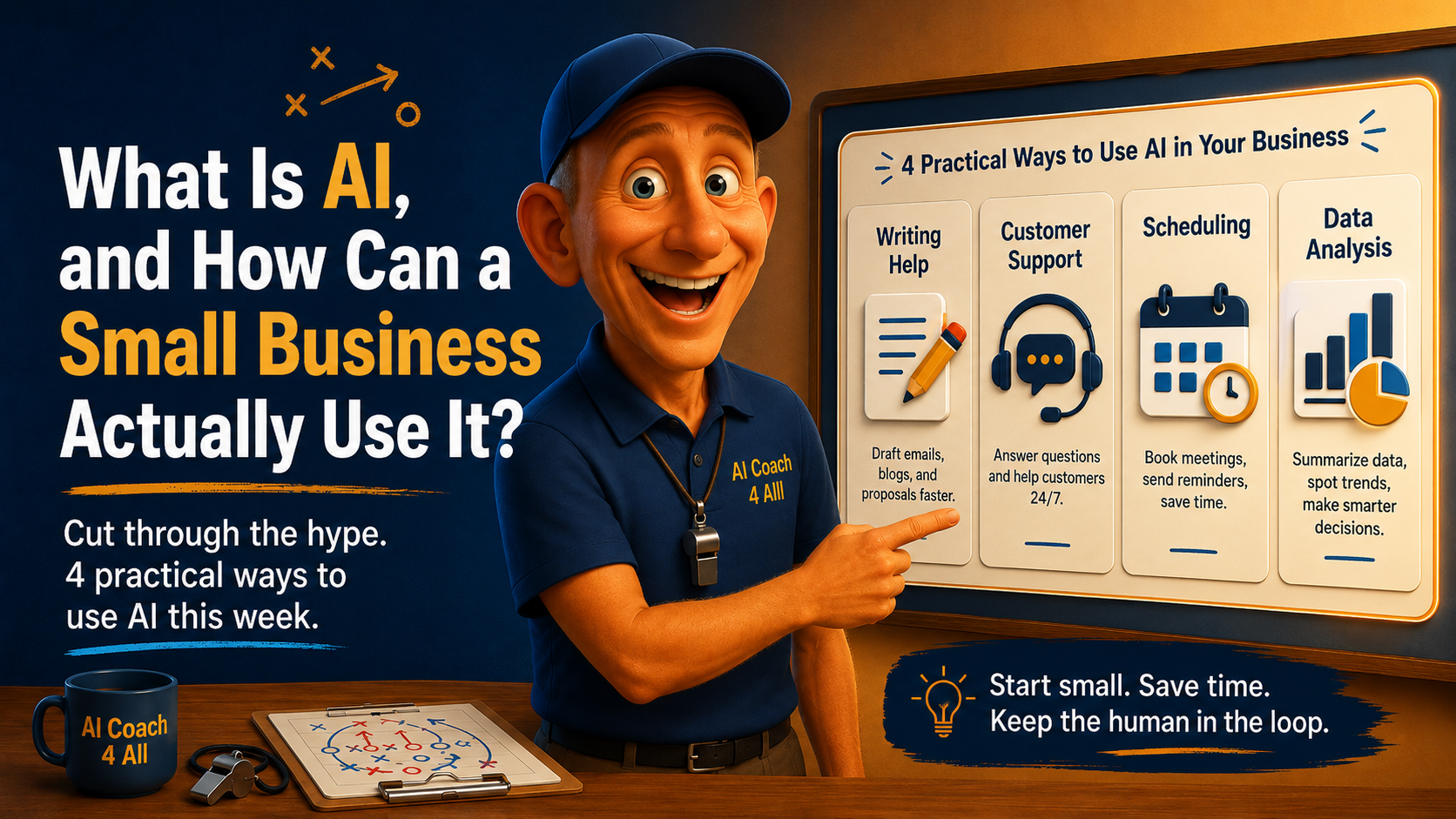
Four Places to Actually Start
You do not need a strategy document or a six-month rollout. Pick one of these, use it for two weeks, and let the results tell you whether to go further.
1. Writing Help
This is the easiest on-ramp because everyone already writes things all day: quotes, follow-up emails, social posts, job descriptions, the newsletter you keep meaning to send. Marketing and customer communication is where small businesses are spending the largest share of their AI hours, and the vast majority of B2B marketers are now writing at least some copy with AI's help.
How to start: paste three emails you're proud of into your AI tool and ask it to write a new one in that same voice. It's not writing from nothing. It's writing like you, faster.
2. Customer Support
Nobody wants a customer to feel like they're talking to a wall of automated non-answers, and you shouldn't build that. But AI is excellent at handling the repetitive first layer: answering "what are your hours," drafting a reply to a common complaint for you to personalize and send, or summarizing a long angry email into three sentences you can respond to calmly.
How to start: take your five most-asked customer questions, feed them to an AI tool with your real answers, and ask it to draft response templates you can personalize in seconds instead of starting from scratch every time.
3. Scheduling
This is less glamorous and genuinely underused. AI tools can draft the back-and-forth of finding a meeting time, write the reminder texts your no-show rate depends on, or turn a messy list of appointments into a clean weekly view.
How to start: describe your week's chaos in plain language, in a spreadsheet or even a paragraph, and ask AI to organize it into a schedule or flag the conflicts. You catch the mistakes before anyone sees them.
4. Data Analysis
You almost certainly have more data than you're using. You have data like sales by month, which services actually make money, which clients keep coming back. AI tools can read a spreadsheet and tell you, in plain English, what's actually going on in it, without you touching a formula.
How to start: upload last quarter's sales numbers and ask a direct question, like "which three months were strongest, and what do they have in common?" You'll get an answer in seconds that used to take an afternoon!!
Five Steps to Actually Get Moving
Pick one task, not five. The businesses stuck in "AI explorer" mode almost always tried to overhaul everything at once. Choose the single most annoying, repetitive task on your plate this week.
Give the AI real context, not a blank prompt. Paste in your actual emails, your actual price list, your actual customer questions. Generic input gets generic output. Specific input gets something you can actually use.
Review everything before it goes out. Treat the first draft the way you'd treat a new employee's first draft. Read it, fix what's off, then send it. This single habit is what separates the 27% who feel confident from everyone else.
Track the time it saves you. Two weeks in, ask yourself honestly whether that one task takes less time now. If yes, expand to a second task. If not, adjust how you're using the tool before giving up on it.
Keep sensitive data out of the wrong tools. Know what you're pasting where. Client financials, health information, and anything under an NDA deserve a business-grade tool with clear data handling terms, not a free consumer app. Protect privacy!
Frequently Asked Questions
Do I need to be technical to use AI in my business?
No. Most AI tools work through plain typed or spoken language, the same way you'd text a colleague. If you can describe a problem in a sentence, you can use AI to help solve it. No coding or special training required to get started.
Is AI going to replace my employees?
For most small businesses, no. AI handles repetitive drafting and sorting tasks so your team spends more time on judgment calls, relationships, and work only a person can do. The businesses seeing the best results use AI to extend their team's capacity, not shrink it. Use AI to outsource the doing, not the thinking. Don’t use it to replace people, but to enhance. Be human first.
How much does it cost to start using AI in a small business?
Very little. The combined cost of two leading consumer AI tools runs around $40 a month, and many tasks work fine on free tiers. Most owners can test real use cases for under $100 a month before deciding whether to invest further.
Is it safe to put my business data into an AI tool?
It depends on the tool and what you're sharing. Reputable business-grade AI platforms have clear data handling and privacy terms. As a rule, avoid pasting sensitive client, financial, or health information into free consumer tools, and read the privacy policy before you rely on any tool for regulated or confidential work.
What's the biggest mistake small businesses make when starting with AI?
Trying to adopt AI everywhere at once instead of picking one specific, painful task first. Owners who start narrow, build a habit, and measure the result end up far more confident and consistent than owners who experiment broadly and never settle into a routine.
The Close
Here's what I want you to take from this: you are not behind. You are standing at the exact moment where being deliberate matters more than being fast. The businesses widening the gap right now didn't do everything. They did one thing, on purpose, and kept doing it.
AI is not going to run your business for you, and it shouldn't. But it will draft the email, answer the easy question, untangle the schedule, and read the spreadsheet, so you can spend your Tuesday doing the part of the job only you can do. Start there. Start small. Just start.
Keep Learning
If you want to learn more about AI, check out some of my other blog posts.
What Is an AI "Skill"? A Plain-English Guide for Business Owners — How Skills differ from Custom GPTs and prompts, and when a small business actually needs one.
About the Author
Robb Almy is the founder of AI Coach 4 All, where he teaches AI and helps businesses navigate the complexities of the AI landscape. He helps businesses apply AI to business problems. He helps businesses translate data into decisions and adopt AI adoption responsibly. Robb helps small business owners cut through AI hype and adopt the tools that actually save time and spawn creative workflows that make a difference.
A note from Robb... I use AI tools, primarily Claude, ChatGPT and Gemini to research, outline, and draft my content. I provide any source material such as personal stories, frameworks, the business experience, and the judgment about what will actually help you. AI creates the first draft based on my own context and voice. I carefully review and edit everything before it reaches you.
