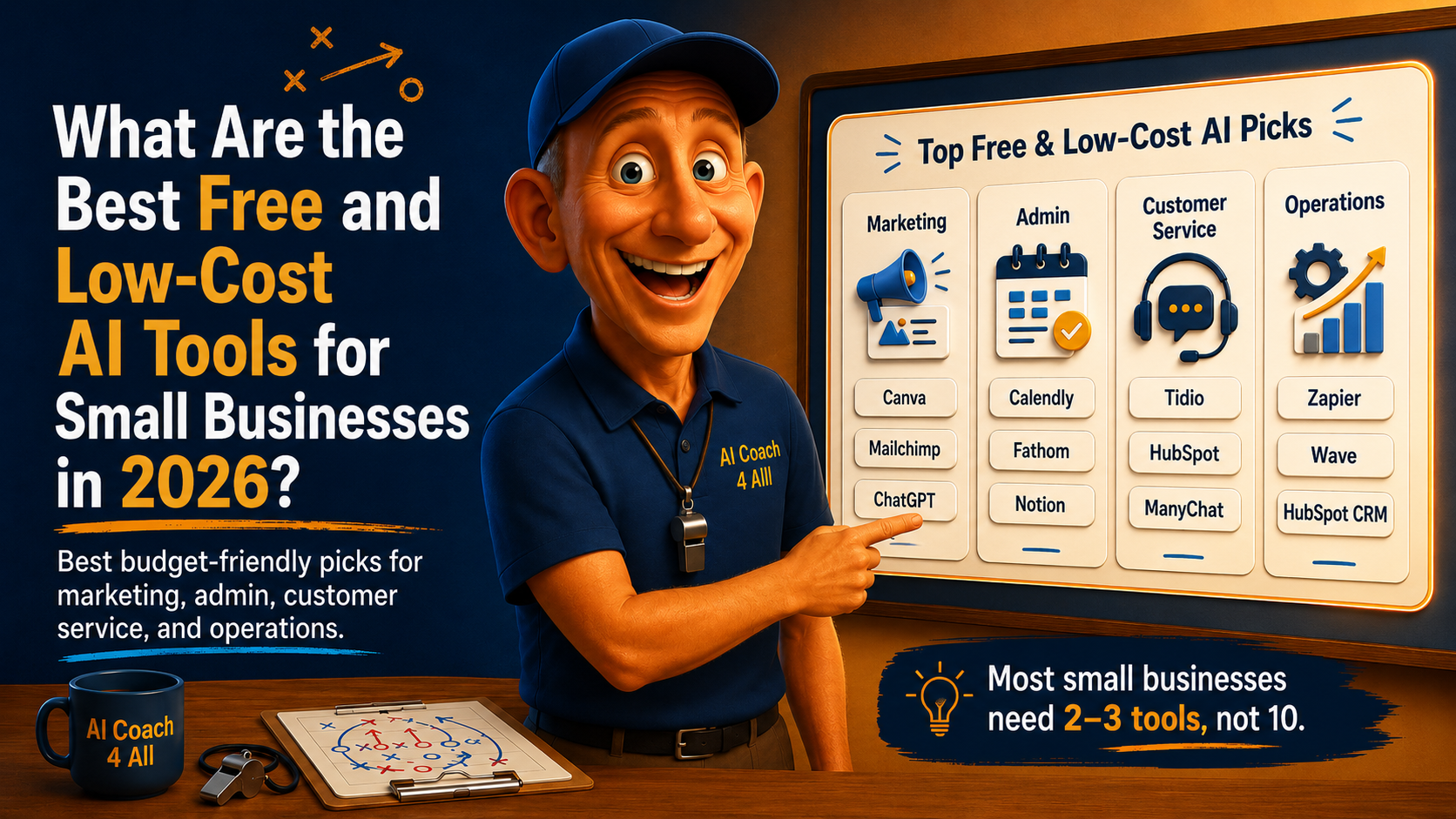
What Are the Best Free and Low-Cost AI Tools for Small Businesses in 2026?
A category-by-category breakdown of what's actually worth using before you spend a dollar.
By Robb Almy, Founder of AI Coach 4 All
Imagine you own a small plumbing company. You have twelve employees, a stack of unanswered voicemails, and a cousin who keeps texting you "you NEED to be using AI." You open your phone, search "best AI tools for small business," and land on a list of forty products, half of them enterprise platforms priced for companies with an IT department you don't have. You close the tab. Nothing gets automated. The voicemails continue to pile up.
That scene plays out in small businesses every day, and it's the reason this question keeps landing at the top of search results. What actually works when you're small and watching every dollar?
Here's the direct answer. You do not need an enterprise AI budget to compete. Across marketing, admin, customer service, and operations, the strongest tools for a small business today are free or under $30 a month, and several of them are the same tools larger companies pay ten times more to access. The trick is not finding the cheapest tool in each category. It's picking the right one for the task that's actually costing you time, and starting there.
Key Takeaways
Free and low-cost AI tools now cover marketing, admin, customer service, and operations well enough that most small businesses don't need to spend anything to get started.
The median small business AI spend has actually fallen in recent years, not risen, as free tiers absorbed more of the basic work.
Marketing (Canva, Mailchimp) and customer service (Tidio) have the most usable free tiers right now.
Admin and scheduling tools like Calendly and Fathom offer free plans generous enough for a solo operator or small team.
The businesses getting the most value aren't running the most tools. They're running two or three, chosen deliberately.
You don’t need the newest model to get value. The benchmarks you hear about with each model release really have little relevance for most small business owners because they are the Ferraris of the AI world and you just need a dependable pick up truck!
Why Does Choosing AI Tools Feel So Overwhelming for Small Business Owners?
Part of it is volume. There are hundreds of AI products competing for small business attention, and most of them market themselves as essential. Part of it is fear of falling behind. Small business owners hear that competitors are already using AI and worry they're the last ones still doing everything by hand. Cap!
Many business owners are exactly in this spot, running through their software stack and shaking their heads at how many logins they already juggle. The instinct is almost always to add one more tool. The better instinct is to figure out which task is actually bleeding time, and match that one task to one tool.
The data backs up the caution. A Goldman Sachs' 10,000 Small Businesses Voices survey found that 76% of small businesses now use AI in some form, yet only 14% have it fully embedded in their core operations. That gap between "using AI" and "AI actually running part of the business" is where most owners get stuck. They sign up for a tool, use it twice, and let the subscription quietly renew. That's not a tools problem. That's a focus problem, and it's fixable before you spend a dime.
What Does the Data Say About AI Spending for Small Businesses?
First, spending has gone down, not up. By 2025, 63% of AI-spending small businesses fell into the bottom spending tier of $1 to $40 a month, while the median monthly AI spend across small businesses dropped from roughly $80 in 2022 to $28 in 2025. That is not a sign that AI got less useful. It's a sign that free tiers and built-in AI features inside tools you already pay for absorbed the work that used to require a separate subscription.
Second, adoption is genuinely mainstream now, not early-adopter territory. The U.S. Chamber of Commerce found that 58% of small businesses use generative AI as of 2025, up from 40% in 2024 and just 23% in 2023. If you haven't started, you're behind the median business owner, not ahead of some hype curve.
Third, the businesses that do adopt AI tend to see it pay off. Salesforce research found that 91% of small businesses using AI report measurable revenue increases. That statistic gets thrown around a lot, and it deserves a grain of skepticism since it's self-reported, but it makes sense that the return usually shows up as time saved on tasks nobody wanted to do anyway, which frees up hours for the parts of the business that actually make money or for employee self-care by forward thinking businesses!
None of that requires a big platform. It requires picking the right free or cheap tool for the specific job.
The Real Budget AI Stack Isn't the Cheapest Tools. It's the Fewest.
Here's where most "best AI tools" lists get it backward. They optimize for cheapest price per tool and end up recommending six different subscriptions, each five dollars a month, that don't talk to each other and that nobody on a four-person team has time to learn.
The better approach is what I call the borrowed stack. Instead of buying separate AI tools for every task, you borrow the AI layer that's already built into software you use or could use for free. Your CRM probably has AI follow-up suggestions baked in already. Your design tool probably has AI image generation baked in already. Your calendar tool probably has AI scheduling baked in already. You are not assembling a system from scratch. You are turning on features that already exist, one category at a time.
That reframe matters because it changes the question from "which ten tools should I buy" to "which one feature, inside a tool I'm already looking at, solves my biggest time drain right now." Start there. Everything below is organized by category so you can find yours.
Which AI Tools Are Best for Marketing on a Small Budget?
Marketing is where AI tools are the most mature and the free tiers are the most generous, because these platforms want you hooked before you ever hit a paywall.
Canva (Free, Pro around $15/month). If you need social graphics, flyers, or basic video edits, Canva's AI features handle background removal, subtitle generation, and layout suggestions without you touching design software. The free tier covers most small business needs. Upgrade only once you're producing content daily and the template limits start to bite.
Mailchimp (Free up to 500 contacts). Mailchimp's free plan supports up to 500 contacts, which covers most small email lists in year one. Its AI features help draft subject lines and suggest send times based on when your specific list actually opens email, rather than generic best practices.
ChatGPT or Claude (Free, paid tiers around $20/month). For blog outlines, ad copy, and social captions, a general-purpose AI assistant does the heavy lifting. ChatGPT's free plan provides conversational AI access with usage limits of roughly 10 messages every five hours, which is plenty for occasional marketing drafts. If you're writing daily, the paid tier removes the wait.
Which AI Tools Handle Admin and Scheduling Without Costing Much?
Admin work is the invisible tax on small business owners! The double-booked meeting, the missed follow-up, the notes from a call three days ago that nobody wrote down. Yikes!!
Calendly (Free for one calendar connection). This eliminates the back-and-forth of finding a meeting time. The free plan covers one calendar connection and unlimited meetings, which is enough for most solo owners and small teams. It won't let you customize much, but it works.
Fathom (Free tier, notably generous). Fathom joins your Zoom, Google Meet, or Teams calls and hands you a transcript, summary, and action items automatically. Business owners who've used it tend to keep recommending it specifically because the free plan doesn't feel like a stripped-down trial. It feels like a real tool. Great for those with a lot of online meetings.
Notion AI (Free for personal and small team use). If you already keep notes, projects, or client information in Notion, its built-in AI summarizes long documents, drafts first passes of proposals, and turns meeting notes into action items, all inside a tool you're likely already paying nothing for.
Which AI Tools Are Best for Customer Service on a Tight Budget?
This is the category where the fastest, most measurable win usually lives, because unanswered messages cost you sales directly.
Tidio with Lyro (Free tier available). Tidio's free plan includes live chat and a basic chatbot, and its AI layer, Lyro, automates up to 67% of customer questions according to the company's own figures. The free Lyro allowance is a one-time pool rather than a monthly refresh, so it's best for testing whether AI chat fits your business before you commit to a paid plan.
HubSpot's free chatbot builder. If you're already using HubSpot's free CRM, its chatbot tool lets you build a visual, no-code bot to schedule meetings, qualify leads, or answer FAQs, without adding a separate subscription.
ManyChat (Free tier, paid plans scale up). For businesses that do most of their customer interaction over Instagram or Facebook Messenger rather than a website, ManyChat handles that specific channel well, with AI features for understanding comments and DMs.
Which AI Tools Are Best for Small Business Operations?
Operations is the broadest category, covering everything from bookkeeping to workflow automation, and it's also where "free" gets murkier since financial tools tend to charge sooner.
Zapier (Free plan covers 100 tasks a month). Zapier's free plan covers 100 tasks per month, and its AI layer now lets you build automations in plain English rather than dragging boxes around a flowchart. This is the tool that connects everything else on this list so information doesn't get stuck in one app.
Wave (Free for core bookkeeping). For basic bookkeeping, Wave's free tier includes AI-assisted transaction import and categorization. It won't handle invoice processing AI the way paid platforms do, but for a solo operator who mostly needs clean books, it's a real, no-catch free option.
HubSpot's free CRM. The core CRM is free for up to two users with no time limit, which is unusual in a category where most competitors gate basic features behind a paywall. Its Breeze AI features draw on a separate credit allowance, so treat those as an upgrade path rather than part of the free plan.
How Do You Actually Start Using These Tools This Week?
Reading a list of tools doesn't save you any time. Using one does. Here's how to move from this article to an actual change in your week.
Name your biggest time drain. Not your biggest problem, your biggest time drain. The unanswered customer messages. The scheduling back-and-forth. The blank cursor on Monday when you need three social posts by noon. Pick one.
Match it to exactly one category above. If it's customer messages, go to the customer service section. If it's content, go to marketing. Resist the pull to solve two problems at once on week one.
Sign up for the free tier only. Don't pay for anything yet. Every tool in this article has a real, usable free plan. Use it long enough to know if the category fits before spending anything.
Give it one real task, not a test. Don't experiment with a fake email. Draft the actual newsletter. Set up the actual chatbot answer for your most common question. Real tasks show you real friction.
Track the time it actually saves, for two weeks. A rough estimate is fine. If Fathom saves you fifteen minutes per call and you take ten calls a week, that's two and a half hours back. Write the number down.
Decide whether the free tier is enough, or the paid tier earns its cost. If you've hit a real limit (contact caps, conversation quotas, feature walls) and the tool is already proving its worth, that's the signal to upgrade. Not before.
Add a second category only after the first one is running on its own. Tool sprawl happens one "just one more" at a time. Protect against it by finishing before you expand.
Frequently Asked Questions
Do I need to pay for AI tools to see real results as a small business? No. Every category in this article, marketing, admin, customer service, and operations, has a genuinely useful free tier available in 2026. Most small businesses can run their first few months of AI adoption without spending anything.
Which AI tool should a small business try first? Start with whichever category matches your biggest time drain, not the tool that's trending. If unanswered customer messages cost you the most, start with a chat tool like Tidio. If content is your bottleneck, start with Canva or a general writing assistant.
Is it risky to use free AI tools with customer data? It can be, so check each tool's data policy before connecting customer information. Free tiers from established platforms (HubSpot, Wave, Tidio) generally follow standard data protection practices, but always confirm before uploading sensitive financial or personal data.
How many AI tools should a small business use at once? Fewer than you think. Most owners get the most value from two or three tools used consistently, not five or six used occasionally. Master one category before adding another.
When does it make sense to upgrade from a free plan to a paid one? Upgrade when you hit a real limit that's costing you business, like a contact cap on your email list or a conversation quota on your chatbot, and the tool has already proven it saves you time. Upgrading before that point is just an added expense with no evidence behind it.
The Tools Aren't the Hard Part
None of the tools in this article are secret. They're sitting in plain sight, most of them free, waiting for a small business owner to stop scrolling long enough to open one and use it. The hard part was never finding the tool. It was deciding, honestly, what's actually costing you the most time, and giving yourself permission to fix just that one thing first.
Start there. The rest of the stack can wait.
About the Author
Robb Almy is the founder of AI Coach 4 All, where he teaches AI and helps businesses navigate the complexities of the AI landscape. He helps businesses apply AI to business problems. He helps businesses translate data into decisions and adopt AI adoption responsibly. Robb helps small business owners cut through AI hype and adopt the tools that actually save time and spawn creative workflows that make a difference.
A note from Robb... I use AI tools, primarily Claude, ChatGPT and Gemini to research, outline, and draft my content. I provide any source material such as personal stories, frameworks, the business experience, and the judgment about what will actually help you. AI creates the first draft based on my own context and voice. I carefully review and edit everything before it reaches you.
